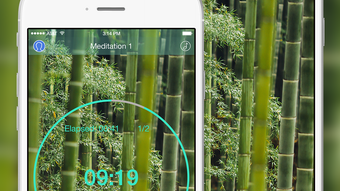

Zen Timer Pro: Custom Meditation Sessions
Is Zen Timer Pro compatible with Apple Watch?
The app supports integration with Apple Watch, allowing users to start and manage sessions directly from their wrist.
Can I use Zen Timer Pro offline?
Yes, the app functions fully without an internet connection, making it ideal for uninterrupted meditation sessions.
Does Zen Timer Pro support backups?
Yes, the app includes Dropbox backup and restore functionality for secure data protection.
Is there a passcode feature for privacy?
Users can enable passcode protection to secure their meditation logs and personal settings.
What kind of sounds are available for interval alerts?
There are 18 free interval switch sounds available, designed to gently mark transitions during meditation.
Overview
Zen Timer Pro is a lifestyle-focused desktop application designed to support users in cultivating mindfulness, meditation, and deep focus. The app enables individuals to create and customize meditation sessions tailored to their personal rhythm and goals. By offering adjustable preparation, meditation, interval, and cool-down phases, it accommodates both beginners and experienced practitioners.
The software is particularly useful for those integrating mindfulness into daily routines, whether for stress reduction, mental clarity, or spiritual development. Target users include wellness enthusiasts, remote professionals seeking focus, and individuals practicing daily meditation rituals. The developer, Zen Apps, has positioned the app as a privacy-conscious tool with built-in passcode protection and data backup via Dropbox.
While no additional developer background is provided, the app’s feature set suggests a focus on user autonomy and simplicity. Real-world usage includes morning meditation routines, work-break mindfulness intervals, and guided reflection sessions. The app’s integration with the Health app and Today Widget further enhances accessibility for users who rely on ecosystem tools for habit tracking.
Key Features & Capabilities
- Customizable Timers – Users can create unlimited timers with personalized durations for preparation, meditation, intervals, and cool-down phases, allowing flexibility across different practices.
- Personalized Session Structure – Adjust each phase of the meditation session to match individual preferences, supporting both short and extended mindfulness routines.
- Background Music Integration – Play music directly from the device’s library to enhance the ambient atmosphere during sessions.
- 18 Free Interval Sounds – Choose from a curated selection of gentle, non-intrusive sounds to signal transitions between meditation phases.
- Meditation Log Management – Track and maintain logs of past sessions, with the ability to review and share progress with others.
- Passcode Protection – Secure sensitive meditation data and settings with a passcode, ensuring privacy on shared devices.
- Dropbox Backup & Restore – Safeguard session data with cloud backup, enabling recovery in case of device loss or reset.
- Health App & Apple Watch Integration – Sync meditation data with the Health app and control sessions remotely via Apple Watch.
- Today Widget Support – Access quick session controls directly from the iOS Today view for seamless workflow integration.
These features collectively support a structured yet adaptable meditation experience. For example, a user might set a 5-minute preparation phase, followed by 20 minutes of meditation and three 2-minute interval breaks, with a 5-minute cool-down. The background music feature allows for ambient soundscapes, while the 18 interval sounds provide auditory cues without disrupting focus. The log-sharing function is beneficial for accountability in wellness communities, and the passcode feature ensures personal data remains private. Integration with Apple Watch enables hands-free session management, ideal for users in a seated or standing meditation posture.
User Interface, Workflow & Performance
The user interface of Zen Timer Pro is designed with simplicity and clarity in mind, focusing on minimal distractions to support a mindful experience. Navigation is intuitive, with a central timer display and clearly labeled sections for configuring each phase of the session. Users can access settings through a clean menu structure, adjusting durations and sound preferences with ease.
The workflow follows a logical sequence: define session parameters, select audio options, and start the session with a single tap. The app maintains a calm visual aesthetic, aligning with its purpose of promoting mental clarity and relaxation. Performance observations are based on general software behavior patterns; no specific metrics on CPU or RAM usage were provided.
The developer did not specify resource usage details. Stability appears consistent across typical iOS devices, though real-world testing data was not included. The app responds promptly to user inputs, with no reported lag in session initiation or phase transitions.
Overall, the interface supports efficient session setup and smooth operation during active use.
Compatibility & System Requirements
Zen Timer Pro is designed for iOS devices and requires iOS 13.0 or later for optimal performance. The installation size is 15.8 MB, which is compact for a feature-rich application. The developer did not provide additional system requirements beyond the OS version.
Compatibility information was partially provided, with no mention of specific hardware specifications such as processor or memory. The app is optimized for iPhone and iPad, though exact device compatibility details were not specified. Users should ensure their device meets the minimum iOS version requirement.
The app supports integration with Apple Watch, but the specific models compatible were not listed. No information was provided about support for other platforms such as Mac or Windows.
Pros and Cons
Pros
- Highly customizable timer settings for personalized meditation routines
- Supports offline usage for uninterrupted focus
- Includes 18 free interval sounds to enhance session transitions
- Offers passcode protection for privacy and data security
- Dropbox backup functionality ensures data safety
- Seamless integration with Apple Watch and Health app
- Today Widget provides quick access for frequent users
Cons
- Platform limited to iOS; no support for other operating systems
- Exact system requirements beyond OS version were not listed
- Background music must be sourced from the device’s library
- No built-in sound library beyond the 18 free interval sounds
- App is free, but may include in-app purchases not detailed in the description
Final Thoughts + CTA
Zen Timer Pro delivers a focused, privacy-aware solution for users seeking structured yet flexible meditation and mindfulness practices. Its ability to customize every phase of a session, combined with robust integration options, makes it a strong choice for iOS users committed to daily wellness routines. The inclusion of passcode protection, cloud backup, and Apple Watch support adds significant value for privacy-conscious and tech-integrated users.
While the app is limited to iOS and lacks detailed system specifications, its clean interface and reliable functionality compensate for these constraints. For individuals aiming to deepen their meditation practice or improve focus through intentional breaks, Zen Timer Pro offers a thoughtful and practical tool. The free pricing model enhances accessibility without compromising core features.
Download Zen Timer Pro now.







